

 سفارش طراحی
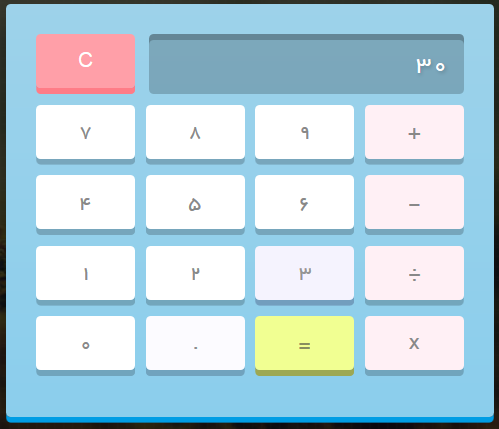
ر کجا که میخوای این ماشین حساب رو قرار بدید ابتدا کد زیر رو قبل از تگ </head> قرار بدید:
<style> #calculator { width: 325px; height: auto; margin: 100px auto; padding: 20px; background: #9dd2ea; background: linear-gradient(#9dd2ea, #8bceec); border-radius: 3px; box-shadow: 0px 4px #009de4, 0px 10px 15px rgba(0, 0, 0, 0.2); box-sizing: border-box; font: bold 14px Arial, sans-serif; } .top span.clear { float: left; } .top .screen { height: 40px; width: 190px; float: right; padding: 0 10px; background: rgba(0, 0, 0, 0.2); border-radius: 3px; box-shadow: inset 0px 4px rgba(0, 0, 0, 0.2); /* Typography */ font-size: 17px; line-height: 40px; color: white; text-shadow: 1px 1px 2px rgba(0, 0, 0, 0.2); text-align: right; letter-spacing: 1px; } .keys, .top {overflow: hidden;} .keys span, .top span.clear { float: left; position: relative; top: 0; cursor: pointer; width: 66px; height: 36px; background: white; border-radius: 3px; box-shadow: 0px 4px rgba(0, 0, 0, 0.2); margin: 0 7px 11px 0; color: #888; line-height: 36px; text-align: center; user-select: none; transition: all 0.2s ease; } .keys span.operator { background: #FFF0F5; margin-right: 0; } .keys span.eval { background: #f1ff92; box-shadow: 0px 4px #9da853; color: #888e5f; } .top span.clear { background: #ff9fa8; box-shadow: 0px 4px #ff7c87; color: white; } /* Some hover effects */ .keys span:hover { background: #9c89f6; box-shadow: 0px 4px #6b54d3; color: white; } .keys span.eval:hover { background: #abb850; box-shadow: 0px 4px #717a33; color: #ffffff; } .top span.clear:hover { background: #f68991; box-shadow: 0px 4px #d3545d; color: white; } /* Simulating "pressed" effect on active state of the keys by removing the box-shadow and moving the keys down a bit */ .keys span:active { box-shadow: 0px 0px #6b54d3; top: 4px; } .keys span.eval:active { box-shadow: 0px 0px #717a33; top: 4px; } .top span.clear:active { top: 4px; box-shadow: 0px 0px #d3545d; } </style>
و این کد رو هم اون قسمت قالب که میخواین قرار داده بشه قرار بدید:
<div id="calculator"> <!-- Screen and clear key --> <div class="top"> <span class="clear">C</span> <div class="screen"></div> </div> <div class="keys"> <!-- operators and other keys --> <span>7</span> <span>8</span> <span>9</span> <span class="operator">+</span> <span>4</span> <span>5</span> <span>6</span> <span class="operator">-</span> <span>1</span> <span>2</span> <span>3</span> <span class="operator">÷</span> <span>0</span> <span>.</span> <span class="eval">=</span> <span class="operator">x</span> </div> </div> <!-- PrefixFree --> <script src="https://rozup.ir/up/sv7/nice_skin_post_image/post_image1/cal.js" type="text/javascript" type="text/javascript"></script> <script> // Get all the keys from document var keys = document.querySelectorAll('#calculator span'); var operators = ['+', '-', 'x', '÷']; var decimalAdded = false; // Add onclick event to all the keys and perform operations for(var i = 0; i < keys.length; i++) { keys[i].onclick = function(e) { // Get the input and button values var input = document.querySelector('.screen'); var inputVal = input.innerHTML; var btnVal = this.innerHTML; // Now, just append the key values (btnValue) to the input string and finally use javascript's eval function to get the result // If clear key is pressed, erase everything if(btnVal == 'C') { input.innerHTML = ''; decimalAdded = false; } // If eval key is pressed, calculate and display the result else if(btnVal == '=') { var equation = inputVal; var lastChar = equation[equation.length - 1]; // Replace all instances of x and ÷ with * and / respectively. This can be done easily using regex and the 'g' tag which will replace all instances of the matched character/substring equation = equation.replace(/x/g, '*').replace(/÷/g, '/'); // Final thing left to do is checking the last character of the equation. If it's an operator or a decimal, remove it if(operators.indexOf(lastChar) > -1 || lastChar == '.') equation = equation.replace(/.$/, ''); if(equation) input.innerHTML = eval(equation); decimalAdded = false; } // Basic functionality of the calculator is complete. But there are some problems like // 1. No two operators should be added consecutively. // 2. The equation shouldn't start from an operator except minus // 3. not more than 1 decimal should be there in a number // We'll fix these issues using some simple checks // indexOf works only in IE9+ else if(operators.indexOf(btnVal) > -1) { // Operator is clicked // Get the last character from the equation var lastChar = inputVal[inputVal.length - 1]; // Only add operator if input is not empty and there is no operator at the last if(inputVal != '' && operators.indexOf(lastChar) == -1) input.innerHTML += btnVal; // Allow minus if the string is empty else if(inputVal == '' && btnVal == '-') input.innerHTML += btnVal; // Replace the last operator (if exists) with the newly pressed operator if(operators.indexOf(lastChar) > -1 && inputVal.length > 1) { // Here, '.' matches any character while $ denotes the end of string, so anything (will be an operator in this case) at the end of string will get replaced by new operator input.innerHTML = inputVal.replace(/.$/, btnVal); } decimalAdded =false; } // Now only the decimal problem is left. We can solve it easily using a flag 'decimalAdded' which we'll set once the decimal is added and prevent more decimals to be added once it's set. It will be reset when an operator, eval or clear key is pressed. else if(btnVal == '.') { if(!decimalAdded) { input.innerHTML += btnVal; decimalAdded = true; } } // if any other key is pressed, just append it else { input.innerHTML += btnVal; } // prevent page jumps e.preventDefault(); } } </script>
 دانلود اسکریپت مهر طرح ورژن (16)
 قالب تک صفحه ورودی چت روم
 اموزش حذف کد اواتار در لیست انلاین